A Pretty Shitty Week

I am writing this, since I often process crappy stuff by writing about it, and also since I know that my family isn’t reading my blog. A long time ago, my now oldest daughter Natalie (and therefore my wife and I) experienced what was then the scariest day of our life. We almost lost Natalie that time. Earlier this week it all came crashing over us again.

My daughter came home from school complaining about stomach ache. She said that it would probably pass in a bit, but my mind was already racing. We waited for a bit, but the pain didn’t seem natural and wasn’t getting any better. Given her history we weren’t taking any chances, and I convinced my daughter that it is better to go once too many and that she would sleep better tonight if a doctor told her that it wasn’t anything scary. I drove directly to the nearest large hospital, LUKS, and went straight for the emergency room. Meanwhile my wife stayed at home to search for a letter from the Karolinska Hospital describing her prior medical history.

When we arrived Natalie was already in a lot of pain, but her usual brave self. I told the emergency crew about her previous history and they hooked her up to fluids. Meanwhile my wife had found the letter and sent a photo of it to my phone. The emergency crew read it and asked me to email it to them. I believe this made them take this more seriously, which was turned out to be good.

They did an ultra sound, after which they called the surgeons who in turn asked for a CT scan. Whilst waiting for the CT scan to be done, the nurse asked me how I was doing. I must admit that I broke down. As a parent, I guess one of the hardest things you do is to try to stay clear headed and strong for your kids, and try not to show them how scared you are. I was terrified, and all the memories from that day almost 15 years ago came crashing down over me again.

After this we were directed to an emergency room, and they put in a stomach probe through my daughter’s nose. Everyone was friendly and professional, but my heart broke when I heard my daughter ask the nurse “will I die”, and the nurse replied “many things will have to go wrong for that to happen”. That is such a dumb thing to say to very scared 16 year old girl. Natalie looked over at me, absolutely terrified. I tried my best to reassure her and to let her know that nothing was going to happen, and that she was at the best possible place and that she was getting the best possible care.

They tried to blow air through the probe to get things started and gave her fluids and painkillers. They said they wanted to avoid surgery if they could, and wanted to wait to see if the treatment would sort it out. Meanwhile I tried calling my insurance company to ask if there was any way I could stay with her. I was certainly not going to leave her there alone. I couldn’t get through, but luckily I had installed the insurance company app, and it turned out I had a Flex insurance which allowed for “Rooming In”, which meant we got a room for just the two of us and that I could stay with her. We got to the room at 2 am or so. She was still in pain, and it was hard for her sleep with the tubes and lines. She is such a strong kid though.

For a while it seemed like the treatment was improving things a little. My wife gathered some clothes for Natalie and she came over to stay with her, and I went home to take care of the other kids. Then things went downhill. Yesterday they made the decision to perform surgery. They had three options. They said that they would try to do peephole surgery, but that in the worst case they’d have to open her up, with another two options there. If we were lucky it would be over in 15 minutes. She was rolled into surgery around 9 a.m., and we didn’t hear anything back until after 11. My wife got to see her after 12. Apparently there were three separate places where there intestines were obstructed.

Today she is on the mend. She has eaten a little bit of soup, and as far as I know she got to keep it. She’ll likely be in the hospital for a few more days, but it looks like the crisis has been averted for this time. Please, pretty please, let this be the last and final one. I’m not sure I can stand watching her in that kind of pain again.

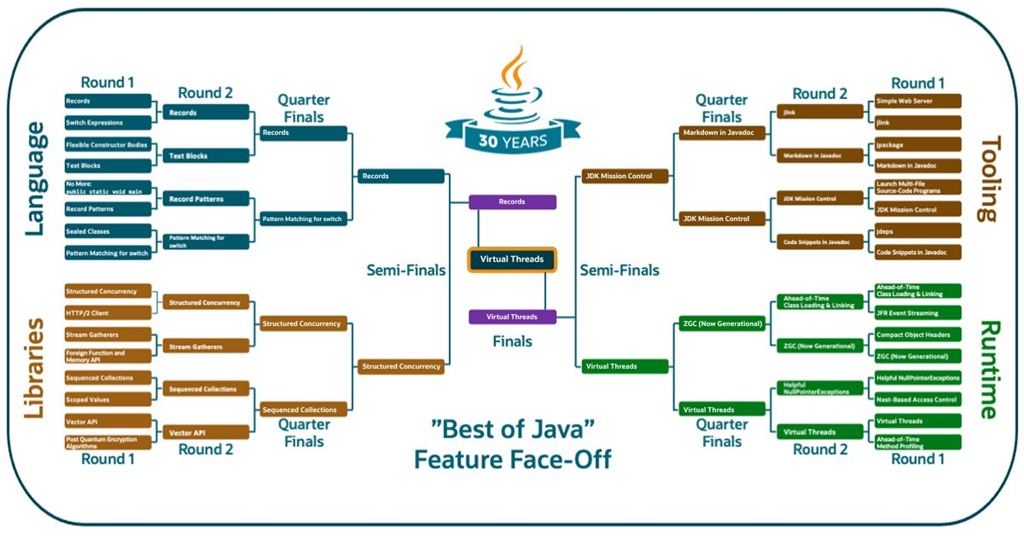
“Best of Java” Feature Face-off 2025

The results are in from this year’s “Best of Java” Feature Face-Off on Twitter/X!

While Mission Control once again secured a win in the Tools category, it ultimately (and perhaps not too surprisingly) lost against Virtual Threads — arguably the most impactful runtime feature added to Java in the past years.

jmc-feature-faceoff

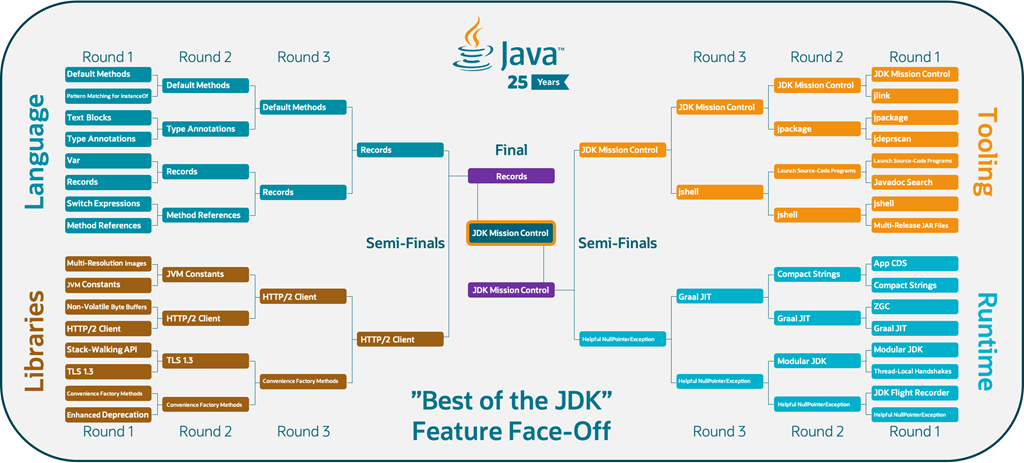
In the last edition of the Feature Face-Off (2020), JDK Mission Control won it all:

faceoff

Here’s to hoping there are even more exciting language and/or runtime features in the face-off for 2030! Smile

If you’re interested in open source development, and would like to get involved in the development of JDK Mission Control, feel free to reach out:

TL;DR:

  • 2020: JDK Mission Control won the “Best of the JDK” Feature Face-Off

  • 2025: JDK Mission Control won the Tools category

  • 2025: Virtual Threads won the final and took the overall crown

What is that countdown all about?

If you’ve visited hirt.se lately, you may have noticed a new countdown ticking away. Since a few people have reached out to ask what it means, I figured I should probably explain myself. In my defence, the counter was really just added for the family. 

The short answer: when the timer hits zero, my family and I will be moving to a new house. Still in Küssnacht — I can literally see the new place from where we live now, just a few hundred meters away.

So no, it’s not a doomsday clock, and it’s definitely not heralding the rapture. It’s just a move.

Knowing how these things typically go, expect the usual moving-day(s) comedy of errors: internet disruptions, servers bumping down staircases, spontaneous cable sacrifices… If the blog disappears for a bit, that’s why.

JDK Mission Control 9.1.1 Released!

Important: If you are using JDK Mission Control on Windows – update to this version!

The source release of JMC 9.1.1 was tagged 2025-07-11. As per usual it may take some time until vendors have binary builds of JDK Mission Control available.

Mission Control 9.1.1 – New and Noteworthy


General


JMC 9.1.1 – New Release!
This is the latest (July 2025) release of JDK Mission Control. JMC 9.1.1 requires JDK 21+ to run and introduces only a platform update that fixes a critical issue on Windows. This version continues to support connecting to, and parsing JFR recordings from, OpenJDK 8u272+ and Oracle JDK 7u40+, and can open and visualize flight recordings from JDK 7 and 8. JDK Mission Control is available for Windows (x86_64), Mac OS X (ARM and x86_64), and Linux (ARM and x86_64).


Eclipse 4.36 support
The Mission Control client is now built to run optimally on Eclipse 2025-06 and later. To install JDK Mission Control into Eclipse, go to the update site (Help | Install New Software…). The URL to the update site will be vendor specific, and some vendors will instead provide an archive with the update site.


Bug Fixes


Area: JFR
Issue: 7003
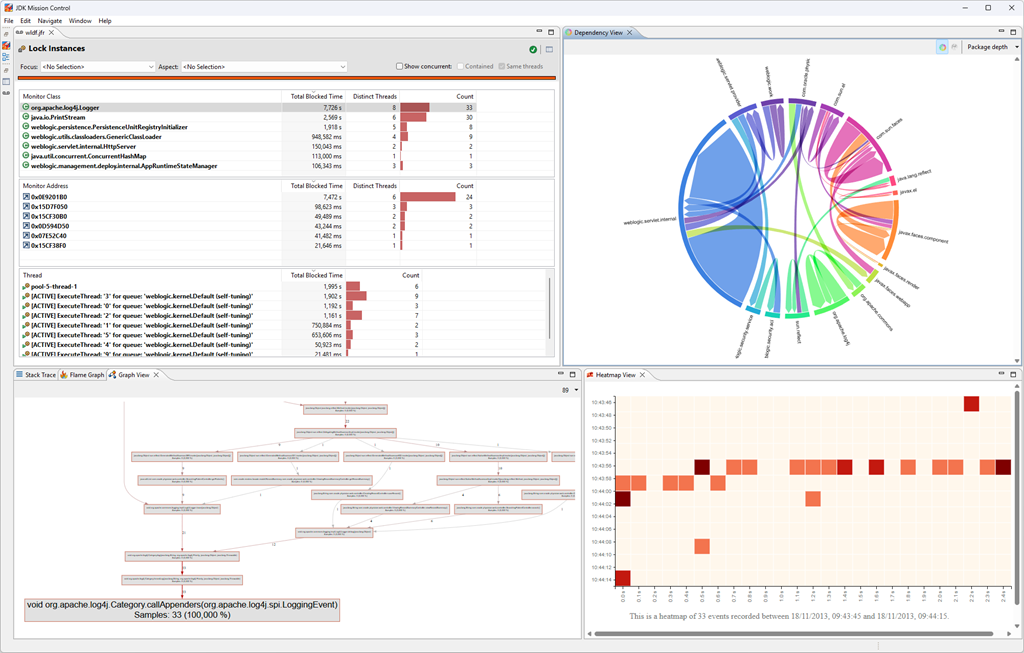
Synopsis: The graph view, heatmap view and dependency view now work on Windows

The update to the latest Eclipse platform includes an updated browser component for windows, that enables the Graph View, Heatmap View, and Dependency View to now work properly.

9.1.1-windows

JDK Mission Control 9.1.0 Released!

The source release of JMC 9.1.0 was tagged 2025-01-31. As per usual it may take some time until vendors have binary builds of JDK Mission Control available.

Here are the release notes:

Mission Control 9.1 – New and Noteworthy


General


JMC 9.1 – New Release!
This is the latest (January 2025) release of JDK Mission Control. JMC 9.1 requires JDK 21+ to run and introduces several new features, enhancements, and bug fixes. This version continues to support connecting to, and parsing JFR recordings from, OpenJDK 8u272+ and Oracle JDK 7u40+, and can open and visualize flight recordings from JDK 7 and 8. JDK Mission Control is available for Windows (x86_64), Mac OS X (ARM and x86_64), and Linux (ARM and x86_64).

jmc


Eclipse 4.34
The Mission Control client is now built to run optimally on Eclipse 2024-12 and later. To install JDK Mission Control into Eclipse, go to the update site (Help | Install New Software…). The URL to the update site will be vendor specific, and some vendors will instead provide an archive with the update site.

eclipse


Support for Jolokia JMX Connection and Discovery
JMC now supports connecting to JVMs using Jolokia, and also supports Jolokia’s auto discovery mechanism.

jolokia


Minor bugfixes and improvements
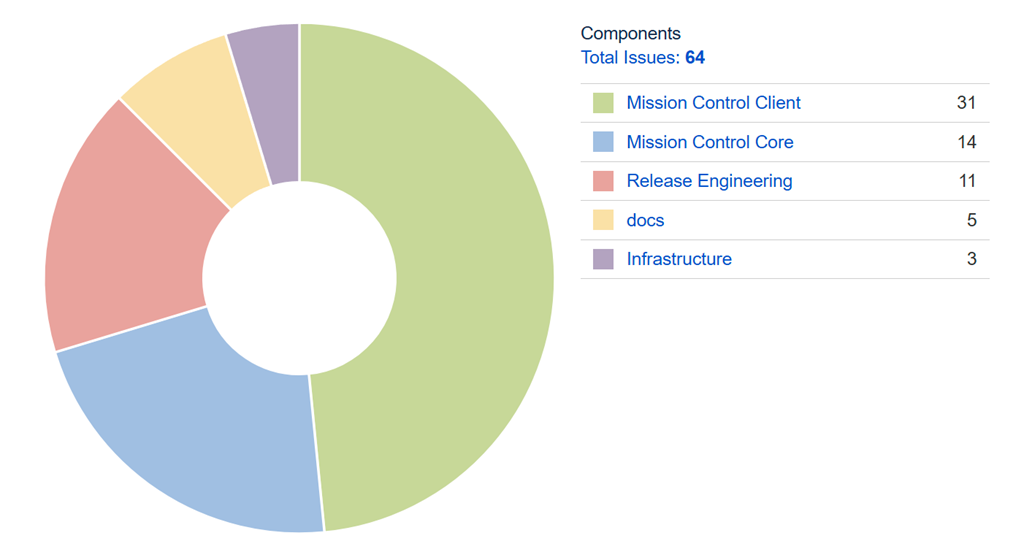
There are 64 fixes and improvements in this release. Check out the JMC 9.1 Result Dashboard (https://bugs.openjdk.org/secure/Dashboard.jspa?selectPageId=23411) for more information.

issues


Core


API to easily write annotated Java JFR events
The JFR Writer API has been extended with the ability to use the custom JFR event types (i.e. classes extending jdk.jfr.Event) and register new writer type for them and also directly accept the instances of those types to write them in the recording.

jfreventsupport


Allow primitive types in converters
Previously a converter could not be used to convert from a primitive type like long. This capability can for example be useful to convert a timestamp (type long) into a human readable string.

agentconverters


Rule for detecting Java process with PID 1
PID 1 is treated specially in Linux, and is assumed to be used by the init process. The init process has some additional responsibilities, such as assuming the responsibility for orphaned processes. The init process is assumed to never quit, and e.g. any signal handler registered for SIGSEV will not be run. This can be problematic, even when running in containerized environments. The rule will detect if this is the case, and propose a path to fixing it (e.g. using tini).

rule


The halt rule result has been improved
The halt rule will now show a table of the top 5 thread halting VM operations.

rule


Better descriptions for the code cache rule
The descriptions for the code cache rule have been improved, highlighting what the effects of a full code cache can be and what actions to take to increase the size of the code cache.

rule


Add support for the new allocation profiler in rules
The following rules have been updated to be able to use the new ObjectAllocationSample events: AllocationByClassRule, AllocationByThreadRule, AutoBoxingRule.

rule


Java Flight Recorder (JFR)


JMC displaying long value in scientific notation
The TLSHandshakeEvent.java records “Certificate Id” as a long value, and JMC was showing it in scientific notation. This was also true for process identifiers. This has now been fixed.

noimage[1]


Showing RSS
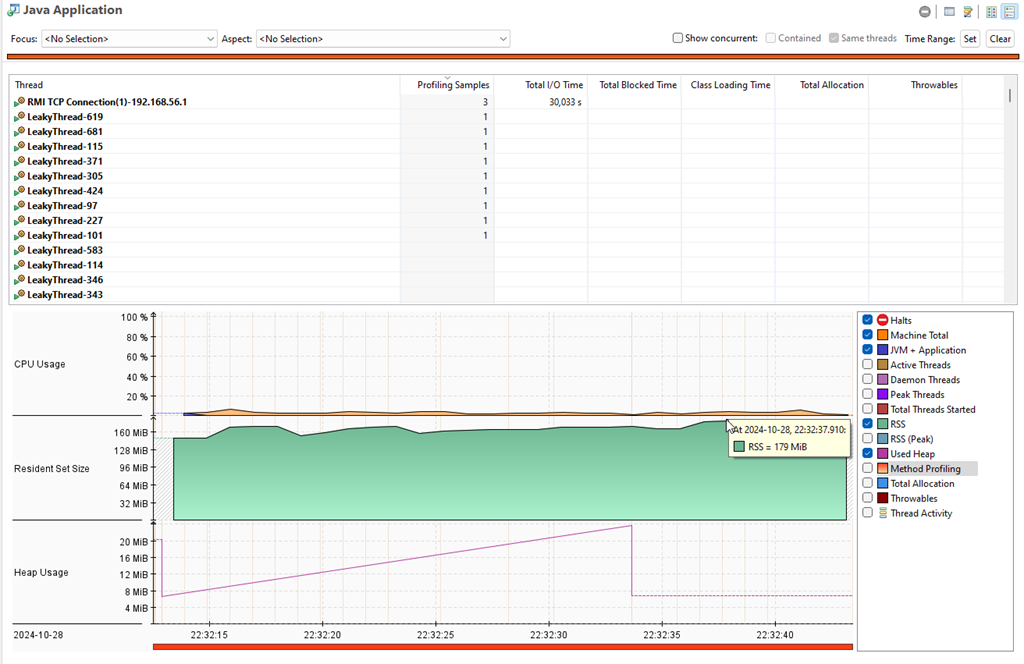
JMC will now show the the resident set size (RSS), both on the memory page as well as the java application page. The RSS can for example be helpful when trying to determine if there is a native memory leak or heavy native memory fragmentation occurring. The RSS graphs can be toggled on and off using the check box legends to the right of the graphs.

rss


Showing thread counts
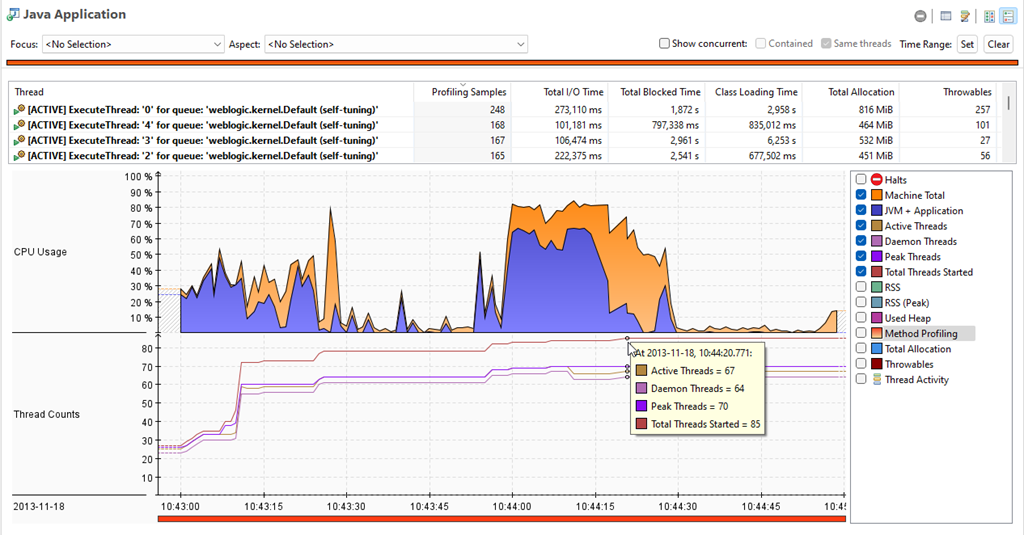
JMC will now show thread counts on the java application page. This can for example be useful when trying to determine if there is a thread leak. The thread count graphs can be toggled on and off using the check box legends to the right of the graphs.

threadcounts


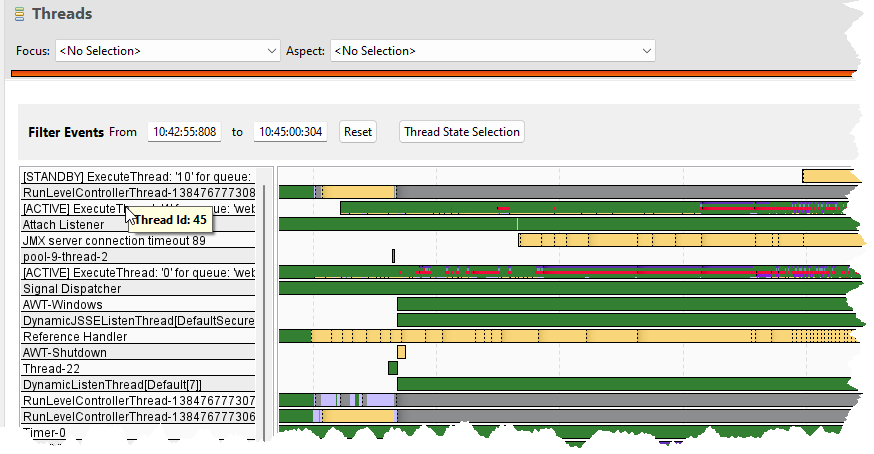
Thread id on hover
In the threads page, hovering over a thread name will show the threadid in the tooltip.

threadid


Bug Fixes


Area: Platform
Issue: 8306
Synopsis: Missing plug-ins while installing JMC in an Eclipse IDE

Mission Control would fail to install because some third party libraries were not included in the update site. This has now been fixed.

Area: Core
Issue: 8295
Synopsis: Shutdown event type id was not properly translated for Oracle JDK 8

The shutdown event type id for legacy Oracle JDK 8, leading to the shutdown time and shutdown reason not being properly displayed on the JVM Internals page.

Area: Core
Issue: 8287
Synopsis: Fix the JMX protocol extenders

The JMC protocol extension mechanism was broken in JMC 9.0.0 when some code was migrated from application to core. This has now been fixed.

Area: Core
Issue: 8303
Synopsis: NPE when running jfr rules reports

The rules report could throw NPEs when an accessor for an attribute could not be found. That has been fixed, and the faulty query responsible for the reported problem has been fixed as well.

Area: JFR
Issue: 8248
Synopsis: Low contrast for the stacktrace view when running in windows high contrast mode

With high contrast mode enabled in Windows 7 and above the contrast on the Stacktrace View was quite low, with the values being barely visible. This has now been fixed.


Known Issues


Area: JFR
Issue: 7071
Synopsis: JMC can’t attach to jlinked JVMs

This one is still under investigation, but it seems JMC can’t attach to certain jlinked images.

Area: JFR
Issue: 7003
Synopsis: The graph view, heatmap view and dependency view does not work on Windows

This is due to a problem with the Windows based browser component in SWT. We’re hoping for a fix in the component for a future version of the Eclipse platform.

AI Assistant for OpenJDK Contributors

Subtitle: ”Soon You’ll Know What I Did This Summer”

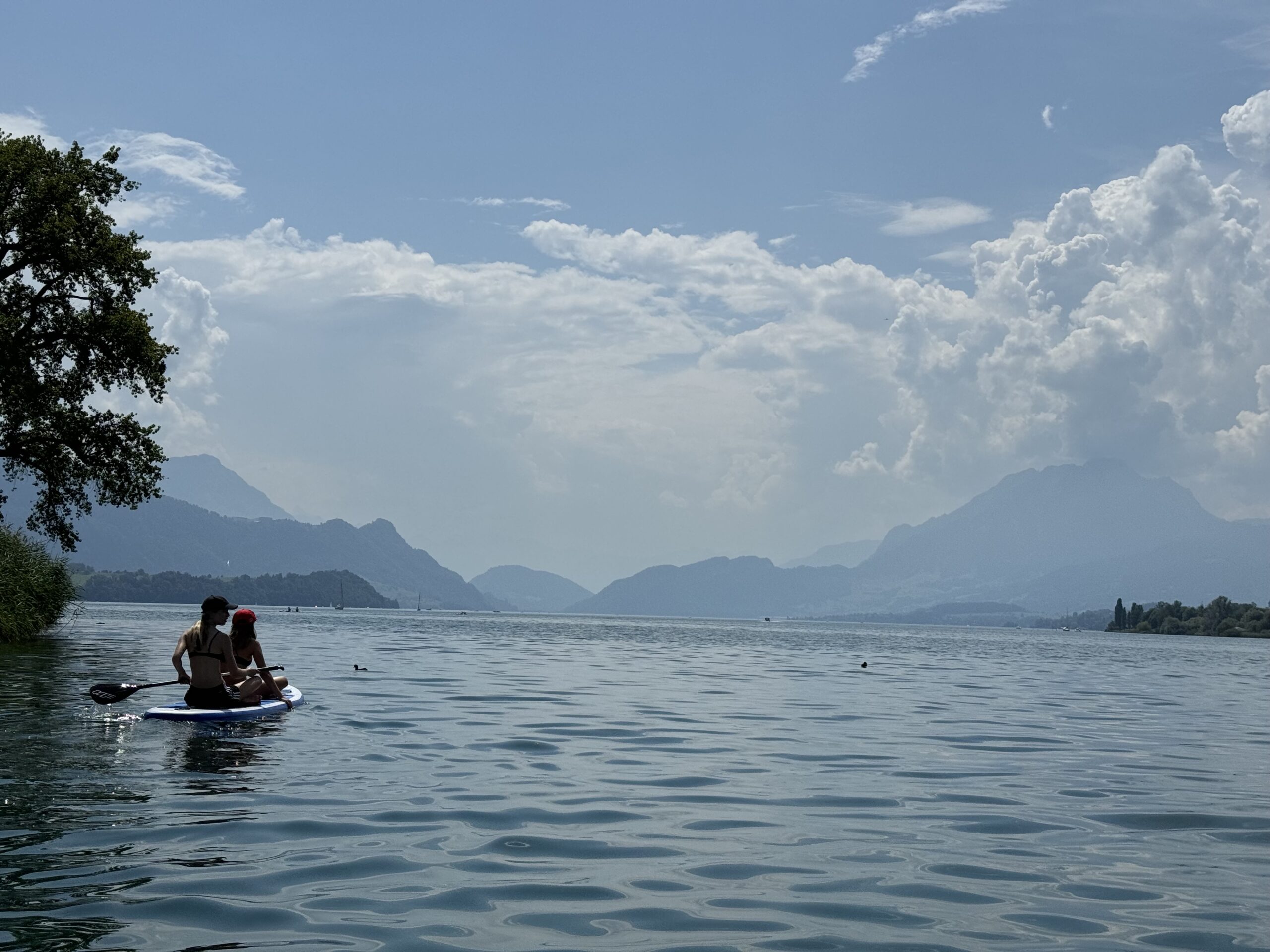
This summer my family and I decided to stay in Küssnacht during my summer vacation. The summers here are lovely, and for a family of six going for a vacation abroad it typically means a lot of time is spent preparing, packing and unpacking, for both directions of the journey. A staycation seemed like a good choice. Most days were spent in the water with the family, and on one occasion, we were joined by a team member and his family. It can get rather hot here, and the lake is the perfect place to cool down.

Me on a SUP overlooking part of my family on another SUP on Lake Lucerne

That said, I did end up in front of my computer a bit in the evenings after everyone else had fallen asleep. There were a few things I really wanted to get done this vacation. One was upgrading my server. Another one was to put some left over Raspberry Pi 4s and a few new Raspberry Pi 5s to good use in my 19” rack, creating my very own a little Kubernetes cluster.

Recently I was also playing with Custom GPTs, which is OpenAI’s way of letting you build little RAG (Retrieval Augmented Generation) systems without writing code. I first played a bit with Custom GPTs on a train ride back from the Datadog office in Paris a little while ago, and it was a quite lot of fun, but for some of the things I wanted it to do, it performed rather badly, and I couldn’t find any fitting APIs available to help my Custom GPT do better.

Since I was setting up a Kubernetes cluster anyway, I thought I might as well hack something together to make my OpenJDK Project Assistant a little bit better.

Setting Up the Cluster

Ah, the pain and the anguish. I ended up using my Apache server as a proxy (since I still want https://hirt.se to serve my old homepage and blog) for an Nginx that is acting as reverse proxy and load balancer to my Kubernetes cluster.

If anyone wants to know how I set up the cluster, that is an entirely different blog that probably already exists in a thousand versions, written by people with more patience to write about configuration than me, so I will not dwell on that. Suffice to say that I consulted many blogs and Claude 3.5 Sonnet to get it all up and running. Here are the steps in short:

  • Format and setup the Raspberries with Raspberry Pi OS (64-bit) (I used the Raspberry Pi Imager).
  • I added my Pis to the hosts file of my server and to my dhcpd config by MAC address, so that I can refer to the Pis by name instead of IP (I’m using dnsmasq).
  • I installed kubernetes on them, which involved properly enabling cgroups in /boot/firmware/cmdline.txt, setting up containerd properly, getting the debian package for k8s, installing kubelet, kubeadm, kubectl, turning off swap, and finally using kubeadm init to create the cluster and then applying flannel. Then using the join command you get from performing the init to have the other Pis join the cluster.

There was a bunch of trial and error, and there is probably a much easier way. Anyway, I now have a cluster. I can easily deploy. I can easily scale. What more could you ever wish for?

The API exposed to the CustomGPT is available to the world at https://api.hirt.se and described here, should anyone be interested. The implementation is available on GitHub – feel free to contribute if the custom GPT isn’t doing what you think it should be doing or if you simply want to make it more capable.

What Can the OpenJDK Project Assistant Do?

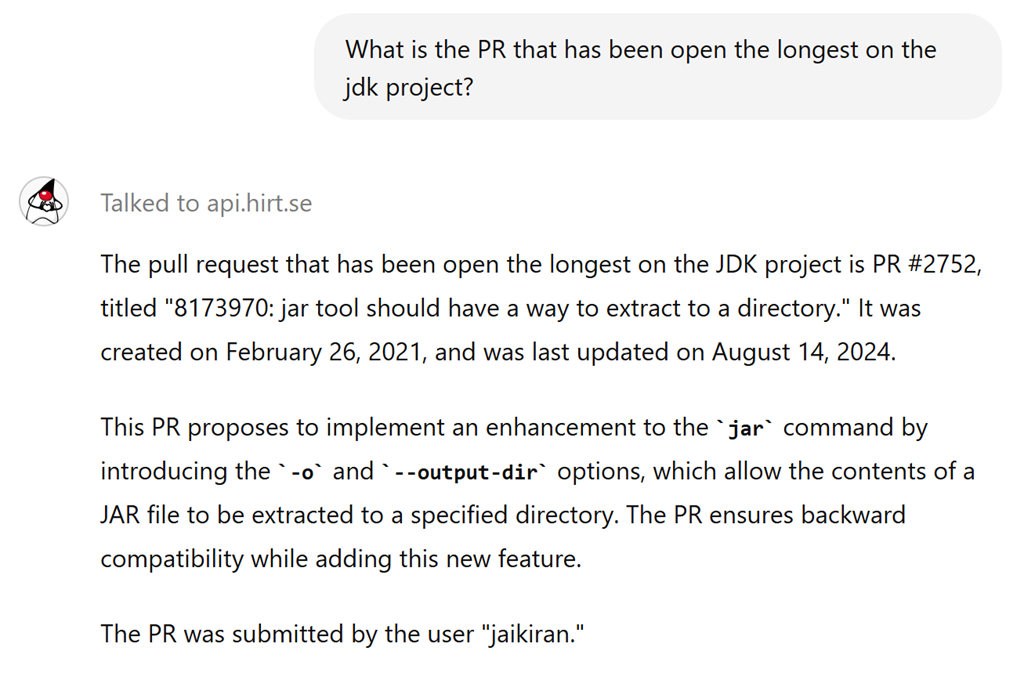
It can do lots of things. It can get information about open PRs and repos without overwhelming GPT with information that will invariably make it fail (this is what typically happened before the api.hirt.se API). For example, here’s getting the oldest open PR for the JDK project:

image (3)

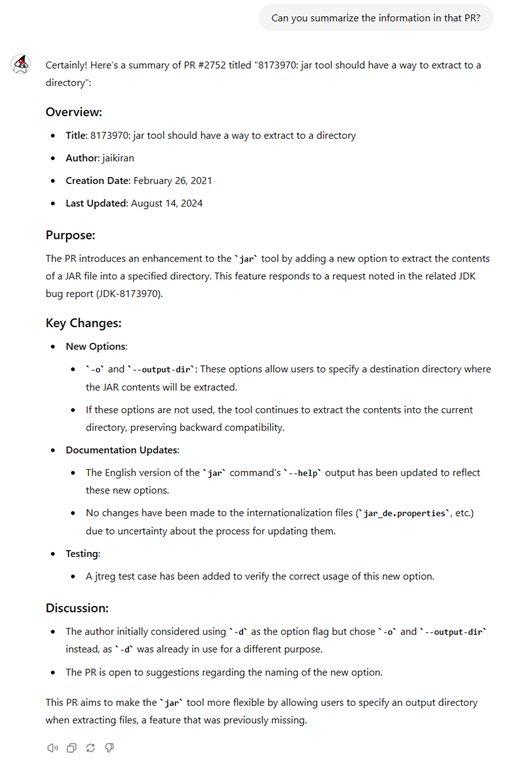
It can summarize the information in the PRs:

image (4)


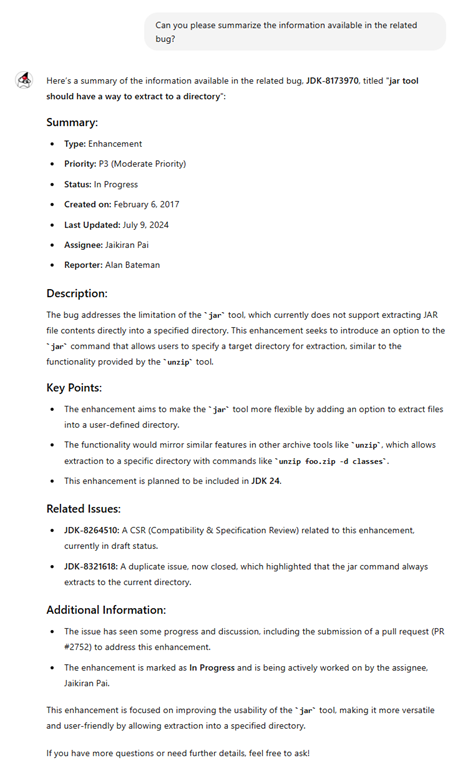
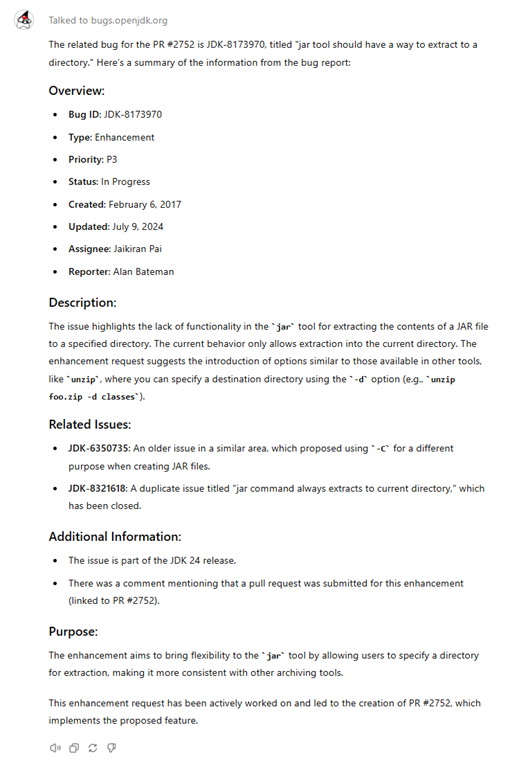
You can also ask for information about the related bug:

image

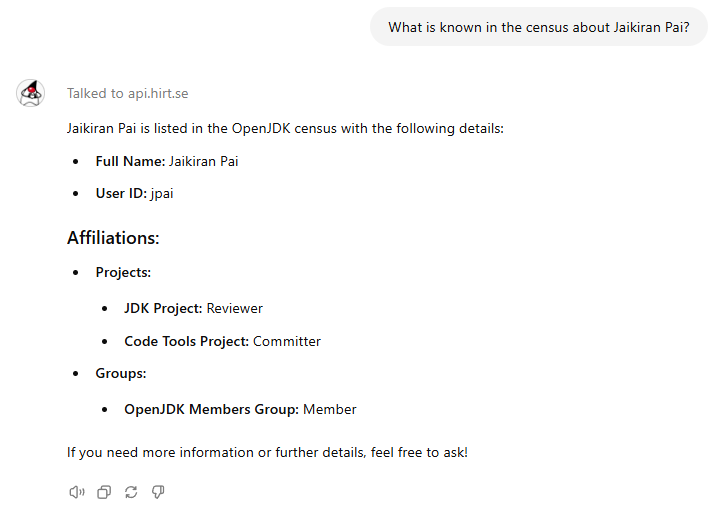
It can answer questions around people involved in OpenJDK:

image

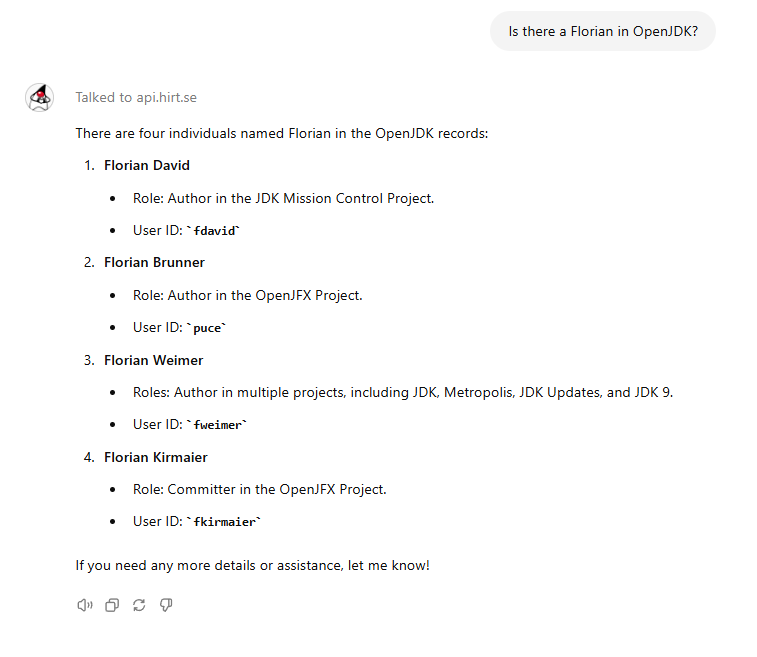
For people like me, who have a really hard time remembering names, it can help answer questions about people involved in OpenJDK:

image

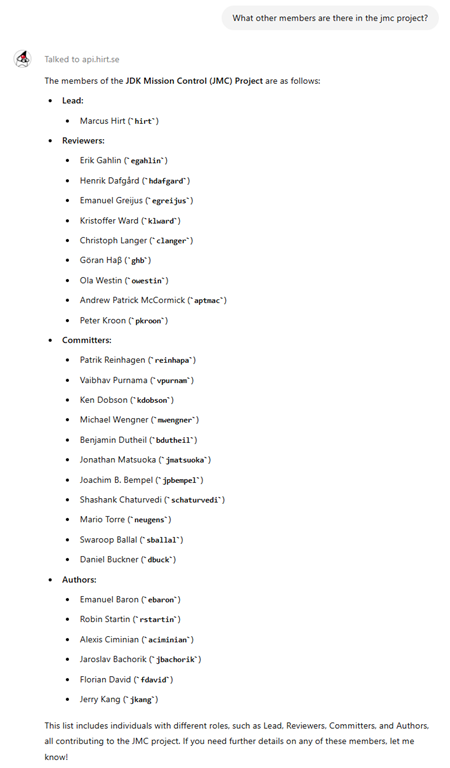
And about projects and groups:
image

Please let me know if you find it useful!

Summary

  • I recently had a stay-at-home vacation in Küssnacht.
  • Aside from spending a lot of the time in Lake Lucerne with my family, I did have some fun building a Kubernetes cluster out of my Raspberry Pis.
  • I put the cluster to good use to support my OpenJDK Project Assistant Custom GPT.
  • If you’re one of the few OpenJDK committers that also have access to Custom GPTs, or you simply like the idea, feel free to put a star on my API repo, or even better – contribute things you want it to be able to do, or do better!
  • Silly bonus: I also noticed that the silly old slogan image generator I was using on my homepage isn’t available under https (after my various upgrades, I now have permanent redirects to always use https). I couldn’t find any replacement that worked as a drop-in replacement, so I made my own variant that is now also running in my little cluster. Smile

Picture looking out over lake Lucerne after vacation dinner with my wife.

JDK Mission Control 9.0.0 Released!

The 9.0.0 GA release of JDK Mission Control was just tagged in the JMC repo at GitHub! Since this is the source release, it may still take a bit of time until the downstream vendors release binary builds of JDK Mission Control 9.0.0. I will try to remember to tweet or say something on the JMC Facebook page once the binaries start showing up.


Mission Control 9.0 – New and Noteworthy


General


JMC 9 – New Release!
This is the latest (2024) major release of JDK Mission Control. JMC 9 requires JDK 17+ to run and introduces several new features, enhancements, and bug fixes. This version continues to support connecting to, and parsing JFR recordings from, OpenJDK 8u272+ and Oracle JDK 7u40+, and can open and visualize flight recordings from JDK 7 and 8. JDK Mission Control is available for Windows (x86_64), Mac OS X (ARM and x86_64), and Linux (ARM and x86_64).

jmc


Eclipse 4.30 support
The Mission Control client is now built to run optimally on Eclipse 2023-12 and later. To install JDK Mission Control into Eclipse, go to the update site (Help | Install New Software…). The URL to the update site will be vendor specific, and some vendors will instead provide an archive with the update site.

eclipse


Support for Linux/aarch64
JMC 9 is now built for Linux aarch64.

linuxaarch64


Support for dark mode
JMC 9 now supports dark mode. Go to Preferences, General | Appearance, and select the Dark theme to enable.

darkmode


Minor bugfixes and improvements
There are 118 fixes and improvements in this release. Check out the JMC 9.0 Result Dashboard for more information.

issues


Add user configuration for local JVM refresh interval
Previously the JVM Browser checked every 5000 ms for new JVMs. This can now be configured.

refreshinterval


Core


Better JFR parser performance
Multiple efforts have been made to reduce allocations in the JMC parser, including: reduced allocation of Doubles, reduced allocation rate in ParserStats. Also, when duration events aren’t ordered by their end time (e.g. events which stack so that the last event finishes first, or file reads with overlaps) `DisjointBuilder.add` can be slow because of the linear search for the lane, and then a linear time reordering. This has been improved with a binary search.

jfrperformance


Support checkpoint event sizes beyond u4 limit
The JMC JFR parser now support checkpoint event sizes beyond the u4 limit.

checkpointsize


Move non-Eclipse dependent classes from org.openjdk.jmc.ui.common to org.openjdk.jmc.common
There were a number of classes previously in jmc.ui.common that would be a great asset to the core distribution (and the third-party applications that consume jmc-core), and these classes now live in jmc.common. Please see JMC-7308 for further information.

reorganize


Move rjmx bundle from application to core
The rjmx classes and related services (FlightRecorderService) are now exposed for third-party application usage. Please see JMC-7069 for further information.

reorganize


Move org.openjdk.jmc.flightrecorder.configuration bundle from application to core
The org.openjdk.jmc.flightrecorder.configuration bundle contains many classes useful for working with jfr, and are now available in core. Please see JMC-7307 for further information.

reorganize


Java Flight Recorder (JFR)


The Event Browser now supports searching and showing event type ids
Searching in the search bar now also searches event type IDs, and there is also a (by default hidden) column that makes it easy to show the event type IDs for the shown events.

eventtypeid


Add support for enabling jfr on native images
Previously JMC was unable to start flightrecorder on a graalvm native image, even if there is built-in jfr support. This has now been fixed.

native-image-alt


Java based flamegraph visualization
The previous flamegraph visualization takes place in an embedded browser component (provided by the Eclipse platform), unfortunately this approach has some drawbacks, the first being a bit slow. This view is now using a Java (Swing) based flamegraph library. Also, the flame graph model creation performance have been improved.

flamegraph


Visualization and Rule for FileChannel.force()
The File I/O page has been updated to show force related information. There are two new columns added – Force Count and Update Metadata. Both are hidden by default and can be enabled by right clicking the table. The chart will also include a File Force row. There is a preference setting for the associated file force rule, where the peak duration warning limit can be set. See JMC PR#533 for more information.

fileforce


Rule that checks on G1 pause time target compliance
New rule that looks at the pause time target and compares it to the actual pauses.

rule


Rule that looks at finalization statistics
JDK 18 comes with a FinalizationStatistics event that helps users find where in their application finalizers are run. This is important as finalization has been deprecated for removal in a future release. For more information about finalization and its flaws, see https://openjdk.java.net/jeps/421. Even if an application doesn’t implement any finalize() methods, it may rely on third-party libraries that does. Static analysis of third-party libraries using “jdeprscan –for-removal” can be used to list those classes, but it will not tell if they are being used. For example, an application may be missing a call to a close() method, so the resource is cleaned up by the finalizer, which is sub-optimal.

rule


Rule that detects GC Inverted Parallelism
Rule inspired by the “Inverted Parallelism” analysis in Garbagecat. See JMC-8144 for more information.

rule


Support for the new JPLIS agent events
There is now a new page and rule for loaded JPLIS agents. See JMC-8054 for more information.

agent


Twitter plug-in removed
Due to changes in APIs and cost of maintenance, the Twitter plug-in has been removed.

twitterplugin


Bug Fixes


Area: Agent
Issue: 8045
Synopsis: retransformClasses() doesn’t re-transform all needed classes

The retransformClasses() methods in Agent and AgentController use Class.forName() to try to get the class objects of classes needed to re-transform. This obviously doesn’t work for classes loaded by classloaders different from the one which loads the agent. Those classes would be instrumented if they were loaded after their event probes were defined the AgentController. But when loaded earlier they would not be instrumented. This has been fixed.

Area: Agent
Issue: 8048
Synopsis: Agent throws exceptions on missing or empty descriptions

When the description of an event or value is empty or missing, the agent fails with exceptions. This has now been fixed.

Area: Console
Issue: 8154
Synopsis: Some JMX attributes are missing unit specifications in the Console

The missing unit specifications have now been added.

Area: Core
Issue: 8063
Synopsis: IMCFrame Type cache not synchronized

The type cache used in the IMCFrame Type inner class wasn’t synchronized and could cause a concurrent modification exception during e.g. JFR parsing. This has been fixed.

Area: Core
Issue: 8156
Synopsis: JfrRulesReport.printReport does not respect verbosity for text and json

The verbosity flag for text and json reports didn’t work. This has been fixed.

Area: Core
Issue: 8041
Synopsis: JfrRulesReport json reports produce incomplete results

While generating JFR Rules Reports in json format, the results were incomplete. The components “message” and “detailedMessage” were not populated. This has been fixed.

Area: JFR
Issue: 7885
Synopsis: Graphical rendering of dependency view fails due to heap memory drain

Also JMC-7496. The dependency view drains the heap memory and causes out-of-memory exceptions and performance delays. This has been improved.


Known Issues


Area: JFR
Issue: 7071
Synopsis: JMC can’t attach to jlinked JVMs

This one is still under investigation, but it seems JMC can’t attach to certain jlinked images.

Area: JFR
Issue: 7003
Synopsis: The graph view, heatmap view and dependency view does not work on Windows

This is due to a problem with the Windows based browser component in SWT. We’re hoping for a fix in the component for a future version of the Eclipse platform.

What is this thing called Profiling?

If you’re reading this blog (I’m originally posting this on hirt.se), you probably already know who I am and my background. As some of you may know, one of my current responsibilities at Datadog is the Continuous Profiler product. After some discussions with profiling team members, I found it interesting that there are many subtly different ideas about what profiling is – often influenced by what a particular ecosystem is calling profiling.

So, here are my (unsolicited) thoughts around what software profiling is. 😉

What’s in a Word

Profiling literally means trying to understand behaviour. When asked to define Profiling, Google will say this:

“the recording and analysis of a person’s psychological and behavioural characteristics, so as to assess or predict their capabilities in a certain sphere or to assist in identifying categories of people.”

This is analogous to what we typically mean when we talk about the profiling of software, which I would simply state as:

“The recording and analysis of a program’s runtime behaviour.”

We’re simply trying to understand how it behaves (recording data), and why it is behaving that way (analysis of the data), so that we can improve some aspect of the program. There are other techniques that we can use to understand the semantic behaviour of a program, such as using debuggers. In profiling though, we’re trying to understand the runtime behaviour – how the program (your code) is behaving in terms of utilization of constrained or costly resources, such as CPU, memory, locking primitives and other potentially thread latency inducing operations and so on.

As to why we want to understand the runtime behaviour, there are a lot of different reasons these days:

  • To support performance engineering, for example:

    • Reducing the cost of running a program.

    • Making the software run faster (throughput).

    • Making the software run smoother (e.g. less latency outliers, less STW-interruptions, less variance).

    • Understanding performance deltas between versions of a program.

    • Optimizing resource utilization.

  • To aid in diagnostics, for example:

    • Help discovering and understanding unknown-unknowns.

    • To help explain deviations from normal behaviour, e.g. why there was suddenly a 40 second delay in the execution of a particular program at a particular point in time.

    • Help provide a link to the source code in the context of something else the user cares about, making whatever occurred more actionable.

I would argue that there are a few additional constraints for a profiler to be truly usable these days:

  • The Heisenberg Observer Effect notes that we can’t observe a system without affecting it. That said, a profiler that materially changes the runtime behaviour of the software it is profiling is not very useful – it will make us bark up the wrong tree.

  • Because of this, profilers will be making trade-offs. If the profiler, in the quest to not affect the runtime behaviour of the software it is profiling, misrepresents the runtime behaviour too much, it is also not very useful.

  • Also, since it is notoriously difficult to build a test which will perfectly mirror the system behaviour on Black Friday, 8:00 p.m. in production, these days you typically want a profiler that has a low enough overhead (it will be too costly otherwise), and that is stable enough, that you can use it continuously in production. A continuous profiler is a very powerful tool for finding the unknown-unknowns, especially when you’re in a tough spot.

  • With the uptake of continuous integration and continuous delivery practices (CI/CD), a new version of a program can be published every few hours, or even more often than that. You will want, at least, to have production data around for every version you publish, and probably from multiple different time periods during the process lifecycle. (Of course, with continuous profiling, this point is moot – you have data for all time periods, should something happen.)

Sampling Profilers

Today, most profilers will be sampling profilers. A sampling profiler is a type of profiler that collects data about a program’s execution by periodically sampling the program’s state at specific intervals. In contrast to other profilers, which typically capture every function call or at specific runtime events, sampling profilers gather information by intermittently observing the program’s execution state.

This means that the correlation with a certain runtime characteristic will depend on when the sample was taken. To do CPU profiling, simply wait for a thread to use up a certain amount of CPU time, then signal the thread and take a sample. To do allocation profiling, wait until a certain amount of memory has been allocated, then take a sample (in the allocation path of the runtime). To do lock profiling, wait until a monitor has been waited on for a certain amount of time, then take the sample (in the appropriate monitor handling path of the runtime). The reason for why one must sample, is that tracing every method/function invocation will cause too much overhead, quite possibly affecting the runtime behaviour of the application.

A sampling profiler will try to sample uniformly over some quantity, for example every 9 ms of CPU-time consumed. This gives some rather nice statistical properties. It is easy to aggregate the samples and relate them to that quantity – “this method is on average using 456.32 ms of CPU time / s”, “that method is responsible for an allocation rate of 845 MiB / s (which in turn is why your garbage collector is running hot)”.

Note that these sampling profilers do not need to pre-aggregate data to be proper sampling profilers. With the advent and adoption of the pprof format, this is sometimes assumed, but there are plenty of sampling profilers that also capture the time the sample was taken. This makes the samples much more useful for diagnostics. One recent example was a Go service where it wasn’t discovered, until the time stamps were preserved, that the service has bursts of activity for a couple of 10s of milliseconds every 10 seconds, which stood out very well in a heat map, once time stamp information was included per sample. Collecting timestamps per sample (and adding context) helps immensely with diagnostics, but more on this later.

We don’t necessarily need stack traces for this to be profiling. We capture whatever is needed to understand how we came to present the observed behaviour. That said, having no execution context at all, for example a simple performance metric, will usually not be enough to satisfyingly help with the analysis part. It’s usually understood that the stack trace will be one of the primary sets of data included in the sample, since it is indeed very useful in many cases and languages.

Also note that the data production rate can still be hard to understand even with a sampling profiler. For CPU it’s relatively easy – the upper limit will be #cpus * average sample size / sample interval. For allocation sampling, it was hard enough that we (Datadog) introduced a new rate limited allocation profiler in OpenJDK, conceptually using a discrete PID controller to control how to subsample (we can’t use reservoir sampling, since we don’t want to do the work up front, and then decide which samples to keep), and also record the amount of memory allocated since the last sample in each sample to be able to normalize.

Execution Tracers and Event Recorders

Another kind of profilers are the so-called execution tracers. An execution tracer instrument certain operations in the runtime and typically provide events around them, often containing useful diagnostics information. For example, the monitor event in JFR will contain information about the monitor class, the thread holding on to the monitor blocking our hero thread, the address of the monitor (so that we can see if there are multiple monitor instances at play), and more. Note that sampling profilers (especially runtime specific profilers) can capture such information as well, so the difference is mostly in how the sample is taken.

Since emitting data for every invocation of a pathway in the runtime can be prohibitively expensive, tools like JFR will provide configuration options to subsample the data in different ways. This can be useful, for example, for outlier profiling. An example of outlier profiling are all the thread latency events in JFR, for example the monitor enter event, where you can specify to only pick events with a duration longer than a specified interval.

Serious drawbacks of execution tracers, even the ones that only capture specific events, are that:

  • Unless there is a subsampling strategy, and even then, the amount of data emitted can be very hard to reason about.

  • Depending on the subsampling strategy, some aggregations will be harder to reason about. For example, if you’re looking at latency outliers, you can paint a picture of where the latency outliers are, but you will not be able to tell what the average latency is.

Performance Engineering

Performance engineering is the black art of optimizing the software to do better on some runtime characteristics. To do that, profiling data is analyzed, for example learning where CPU is spent, so that the program can be optimized to use less resources (e.g. CPU), which in turn makes it less costly to run (need less hardware). Supporting performance engineering is what people most commonly will associate with profiling, and for that use case, it’s most commonly CPU profiling that springs to mind. Many programming languages/runtimes will have the concept of a stack, and ultimately, the underlying hardware will have the concept of hardware threads, and stacks to execute. Therefore, to understand how we came to execute a particular method or function, profilers will often capture a stack trace. Depending on the programming language and environment (such as frameworks used) this can be more or less useful, as practitioners of reactive programming and async frameworks will be very well familiar with. (Project Loom is in a way a response to this problem. Make Stack Traces Great Again! 😉 )

Both sampling profilers and execution tracers can be put to good use to understand the runtime profile of a program. For example, if you demand a little bit more of your distributed tracer and the tracer integrations, and keep tabs of when threads are doing work in the context of a certain trace / span / operationName, you can start aggregating profiling information by endpoint, for example showing the amount of CPU-time spent by a specific endpoint.

endpointprof

Using Profiling for Diagnostics

Of course, when you have samples that contain context and time information, you can also go look at that information when something goes spectacularly wrong. For example, looking at a timeline view of the threads involved in processing a part of a distributed operation that was painfully slow, can reveal a lot. When something goes wrong, and it has not been a priori instrumented by the tracer, logging or some other instrumentation, profiling data is often the last resort for explaining what went wrong. In other words, it can help understand the unknown unknowns.

Here are some screenshots that hopefully will give you some idea of the capability:

Screenshot 2023-06-28 at 17.22.03

Screenshot 2023-06-28 at 17.07.38

Screenshot 2023-06-28 at 17.10.51

For some examples using this feature (in Go), see Felix Geisendörfer’s YouTube video.

Note that these screenshots were from profiling timelines for specific spans in a distributed trace. It’s also possible to look at a timeline for all the threads in the runtime.

Some time ago we had a 21 second span that remained unexplained until the profiling data showed that it was a safe pointing VM operation related to dumping the heap – someone had ssh:d into the machine and used jcmd to request a full heap dump. Had it not been for recording outliers for safe pointing VM operations, this could have been hard to explain. Profilers purely written in Java and using exceptions to force stack walks, or using the Java stack walking APIs, would never know better. For them it would have been like the world would have been stopped, and the only visible effect would have been that the clock suddenly skipped ahead 21 seconds.

TL;DR

  • Profiling is the recording and analysis of the runtime behaviour of a program.

  • Profiling can not only be used for performance engineering, but it can also be a very powerful diagnostic tool.

  • Profiling samples often contain stack traces, but in some paradigms, stack traces will not be the most helpful thing to explain why something ended up being called.

Many thanks to my colleagues at Datadog for all the awesome work they do, and for the feedback on this post.

JDK Mission Control 8.3.0 Released!

The latest release of JDK Mission Control was recently released! Since I am a bit late with this blog, there are already some binary releases available, for example:

Eclipse Mission Control:
https://adoptium.net/jmc/

Zulu Mission Control:
https://www.azul.com/products/components/azul-mission-control/


Mission Control 8.3 – New and Noteworthy


General


JMC 8.3 – New Release!
This is a new minor release of JDK Mission Control. The JMC application requires JDK 11+ to run, but can still be used to connect to, and parse JFR recordings from, OpenJDK 8u272+ and Oracle JDK 7u40+. It can also still open and visualize flight recordings from JDK 7 and 8. JDK Mission Control is built for Windows (x86_64), Mac OS X (ARM and x86_64), as well as Linux (x86_64).

jmc[1]


Eclipse 4.24 support
The Mission Control client is now built to run optimally on Eclipse 2022-06 and later. To install JDK Mission Control into Eclipse, go to the update site (Help | Install New Software…). The URL to the update site will be vendor specific, and some vendors will instead provide an archive with the update site.

eclipse[1]


Minor bugfixes and improvements
There are 51 fixes and improvements in this release. Check out the JMC 8.3 Result Dashboard (https://bugs.openjdk.org/secure/Dashboard.jspa?selectPageId=21205) for more information.

issues


Core


Parser improvements
The performance of the FastAccessNumberMap has been improved for sparse values.

noimage[1]


Java Flight Recorder (JFR)


Dependency View
There is a new view for visualizing call dependencies. There are two modes of operation in the view, chord diagram and edge bundling. In the edge bundling visualization, hover over packages to see dependencies highlighted in colors: green means that methods in the linked package is called by methods in the package being hovered over, yellow means that methods in the linked package are calling mathods in the package being hovered over. Red means that methods in the packages are calling each other. To show the Dependency View, go to Window | Show View | Other… and select the Dependency View under the Mission Control folder.

dependency


Graph Pruning
The graph view in JMC can now be pruned to focus on the most impactful nodes. Select the target number of nodes, and the visualization will show at most that many number of nodes.

graphpruning


Selectable Attribute
It is now possible to select which attribute to use for the weights in the trace view and the flame graph view.

attribute


Parser improvement
The parser now supports parsing events with char fields.


Bug Fixes


Area: General
Issue: 7813
Synopsis: Unable to open Help page in macOS M1 when JMC started with JDK11

The help page was inaccessible, throwing an error on macOS M1 when JMC is run on JDK 11.0.16. This is now fixed.

Area: General
Issue: 7321
Synopsis: Unable to view JMC Help Contents (HTTP ERROR 500 ) when booted with JDK 17 or higher

The help page was inaccessible, throwing an error, when running on JDK 17+. This is now fixed.

Area: JFR
Issue: 7812
Synopsis: Unable to open links from Automated Result analysis page

Links in the results of the automated analysis results would not open properly on Linux and Mac OS X. Now they do open in situ.


Known Issues


Area: General
Issue: 4270
Synopsis: Hibernation and time

After the bugfix of https://bugs.openjdk.java.net/browse/JDK-6523160 in JDK 8, the RuntimeMXBean#getUptime() attribute was re-implemented to mean “Elapsed time of JVM process”, whilst it previously was implemented as time since start of the JVM process. The uptime attribute is used by JMC, together with RuntimeMXBean#getStartTime(), to estimate the actual server time. This means that time stamps, as well as remaining time for a flight recording, can be wrong for processes on machines that have been hibernated.

Area: General
Issue: 7953
Synopsis: Unable to install JMC Plugins on Eclipse 4.25

Because of updates to the naming of certain platform dependencies in Eclipse 4.25 (e.g. JUnit 5 bundles now have name of the form junit-* instead of Orbit variants org.junit.*), it will no longer be possible to install the plug-in version of JMC into Eclipse 4.25+. This will be resolved in a later version of JMC. A workaround for now is to build JMC from the mainline (9.0 EA), and installing the plug-in version from the resulting update site archive.

Area: JFR
Issue: 7947
Synopsis: JMC crashes while performing flight recording on MacOS 13.0_x64

JMC can crash when completing a recording on MacOS 13.0 on x64. It seems to be related to running JavaScript in the Browser component. Eclipse is investigating the issue here.

Area: JFR
Issue: 7071
Synopsis: JMC can’t attach to jlinked JVMs

This one is still under investigation, but it seems JMC can’t attach to certain jlinked images.

Area: JFR
Issue: 7003
Synopsis: The graph, flame graph view, heatmap view and dependency view does not work on Windows

This is due to a problem with the Windows based browser component in SWT. We’re hoping for a fix in the component for a future version of the Eclipse platform.


TL;DR

There is a new version of JMC out. Have fun! Smile

JDK Mission Control 8.2.0 Released!

The latest release of JDK Mission Control was just released! Since this is the source release, it may still take a bit of time until the downstream vendors release binary builds of JDK Mission Control 8.2.0. I will try to remember to tweet or say something on the JMC Facebook page once the binaries start showing up.

Here’s what’s new:

Mission Control 8.2 – New and Noteworthy


General


JMC 8.2 – New Release!
This is a new minor release of JDK Mission Control. The JMC application requires JDK 11+ to run, but can still be used to connect to, and parse JFR recordings from, OpenJDK 8u272+ and Oracle JDK 7u40+. It can also still open and visualize flight recordings from JDK 7 and 8.

jmc


Eclipse 4.22 support
The Mission Control client is now built to run optimally on Eclipse 2021-06 and later. To install JDK Mission Control into Eclipse, go to the update site (Help | Install New Software…). The URL to the update site will be vendor specific, and some vendors will instead provide an archive with the update site.

eclipse


Minor bugfixes and improvements
There are 83 fixes and improvements in this release. Check out the JMC 8.2 Result Dashboard (https://bugs.openjdk.java.net/secure/Dashboard.jspa?selectPageId=20804) for more information.

issues


Binary build for Apple ARM
JDK Mission Control is now built for Apple ARM, allowing JMC to be run natively (without Rosetta x86 emulation) on Apple M1.


Core


Parser support for async profiler
Parser support has been added for frame types generated by async profiler, such as Native, C++ and Kernel.


System.gc() rule
There is now a new rule for explicit invocations of System.gc().

dukegc


Java Flight Recorder (JFR)


Heat map view
A new heat map view has been added, which is handy for seeing when events are taking place. Use Window | Show View | Other…, and select the Heatmap View under Mission Control and click Open to open the view.

heatmap


Websocket for selections
There is a new websocket API available that pushes stack trace data from selections in the JFR UI as JSON on a user defined port. This allows for programmatic control of the visualization directly in the browser. Tools like observablehq.com can be used to invent new visualizations, or to alter the visualization. To get started, simply go to the Flight Recorder preferences in JMC, and select the Websocket port to use (0 to disable). A set of example visualizations are available here: https://observablehq.com/collection/@cimi/java-mission-control.

websocket


Bug Fixes


Area: JFR
Issue: 7403
Synopsis: JFR parser struct types hashcode problem

Some JFR parser struct types were using lazily initialized attributes which happen to be a part of hashCode/equals computations.

Area: JFR
Issue: 7532
Synopsis: Delays in rendering of JMX console graphs

Sometimes the updates of the JMX console graphs would be severely delayed on MacOS. This is now fixed.

Area: JFR
Issue: 7068
Synopsis: JfrRecordingTest (uitest) hangs on the automated analysis page

Trying to run uitests on Fedora hangs on JfrRecordingTest. This was fixed after the Eclipse platform update.


Known Issues


Area: General
Issue: 4270
Synopsis: Hibernation and time

After the bugfix of https://bugs.openjdk.java.net/browse/JDK-6523160 in JDK 8, the RuntimeMXBean#getUptime() attribute was re-implemented to mean “Elapsed time of JVM process”, whilst it previously was implemented as time since start of the JVM process. The uptime attribute is used by JMC, together with RuntimeMXBean#getStartTime(), to estimate the actual server time. This means that time stamps, as well as remaining time for a flight recording, can be wrong for processes on machines that have been hibernated.

Area: JFR
Issue: 7071
Synopsis: JMC can’t attach to jlinked JVMs

This one is still under investigation, but it seems JMC can’t attach to certain jlinked images.

Area: JFR
Issue: 7003
Synopsis: The graph and flame graph view does not work on Windows

This is due to a problem with the Windows based browser component in SWT. We’re hoping for a fix in the component for a future version of the Eclipse platform.